Image Harmonization
Realistic photo composition by integrating human subjects into museum backgrounds using AI
Introduction
Blending a photograph of a person into a different scene is far more than a simple cut-and-paste operation. Differences in lighting, color, and scale between the subject and the background can immediately break the illusion of realism. This solution implements an end-to-end AI pipeline that composites a user-provided portrait onto a selected artwork background in a visually convincing way.
The pipeline handles the full composition workflow: isolating the subject from the original photo, determining the most appropriate placement and crop type, adapting the subject’s appearance to match the background’s lighting and color properties, and finally scoring the quality of the result.
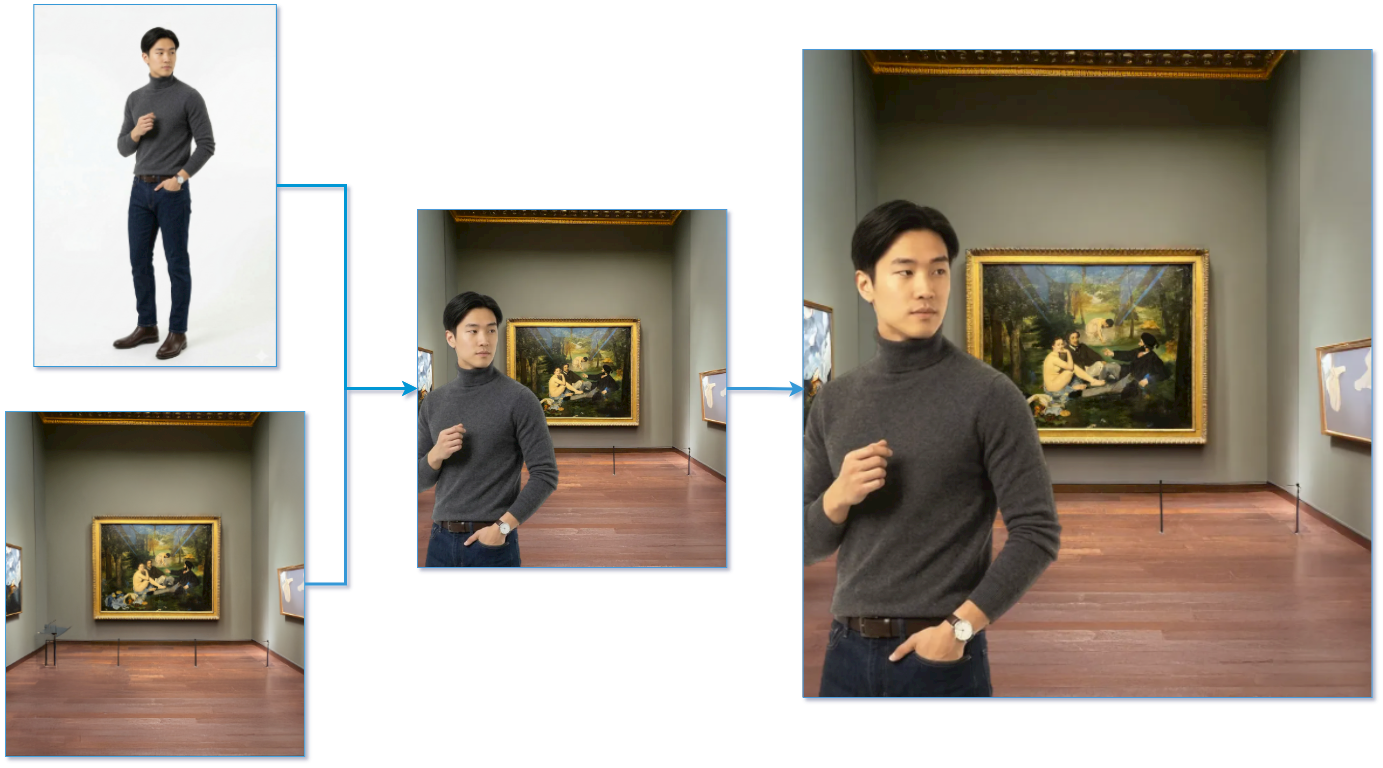 In figure: Composition pipeline: the subject has been extracted from the original photo, placed onto the selected background, and the composition has been harmonized.
Key Features
- Automatic subject extraction: Precisely isolates the foreground subject from the user’s photo, regardless of background complexity.
- Pose-aware placement: Classifies the portrait type (close-up, half-body, full-body) using face detection and automatically matches it to the most suitable position on the artwork background.
- Image harmonization: Adapts the subject’s color and lighting to seamlessly blend with the target background, producing photorealistic compositions.
- Harmonization quality scoring: Quantitatively evaluates the result, enabling automatic selection of the best composition variant.
Technologies Used
- Subject Segmentation: RMBG-1.4 and RMBG-2.0 by BRIA AI, based respectively on IS-Net (a CNN encoder-decoder) and BiRefNet (a transformer-based architecture).
- Face Detection: MTCNN Python library for multi-face detection and portrait type classification.
- Image Harmonization: INR-Harmonization.
- Harmonization Scoring: BargainNet, which measures the stylistic distance between foreground and background to produce a harmonization quality score.
Use Cases
- Cultural and Tourism Applications: Allow visitors of museums or cultural sites to take a souvenir photo with a famous artwork as their background.
- Social Media and Entertainment: Enable users to generate creative, shareable images placing themselves near iconic paintings or scenes.
How It Works
The composition is carried out in four stages:
- Background removal: the subject is extracted from the uploaded photo using a segmentation model, producing a clean foreground mask.
- Portrait classification: face detection determines how many people are present and classifies the crop type (close-up, half-body, or full-body), which is used to select the best bounding box on the background image.
- Composition: the foreground is placed onto the background at the pre-defined bounding box position that best matches the portrait type.
- Harmonization: the composited image is processed by the harmonization model, which adjusts the foreground’s lighting and color to match the background. An optional scoring step evaluates the result.
Live Demo
Explore a simplified version of our pipeline interactively: upload a portrait photo, select an artwork background, and receive a harmonized composition in return.
Try it out
Try out the solution on Hugging Face Spaces:
Integration
The full pipeline is exposed through a REST API. Its modular design allows the pipeline to be integrated into web or mobile applications where users upload a portrait photo and receive a harmonized composition in return.